SDF to SMILES Converter
Molecular Structure Converter
High-throughput transformation across 100+ chemical formats, coordinate generation, force field minimization, and 2D depiction.

Was this tool helpful?
Our SDF to SMILES Converter is a powerful web-based tool designed to translate complex chemical structures into a simple, text-based format. It efficiently converts Structure-Data Files (sdf) into the Simplified Molecular Input Line Entry System (smiles) notation.
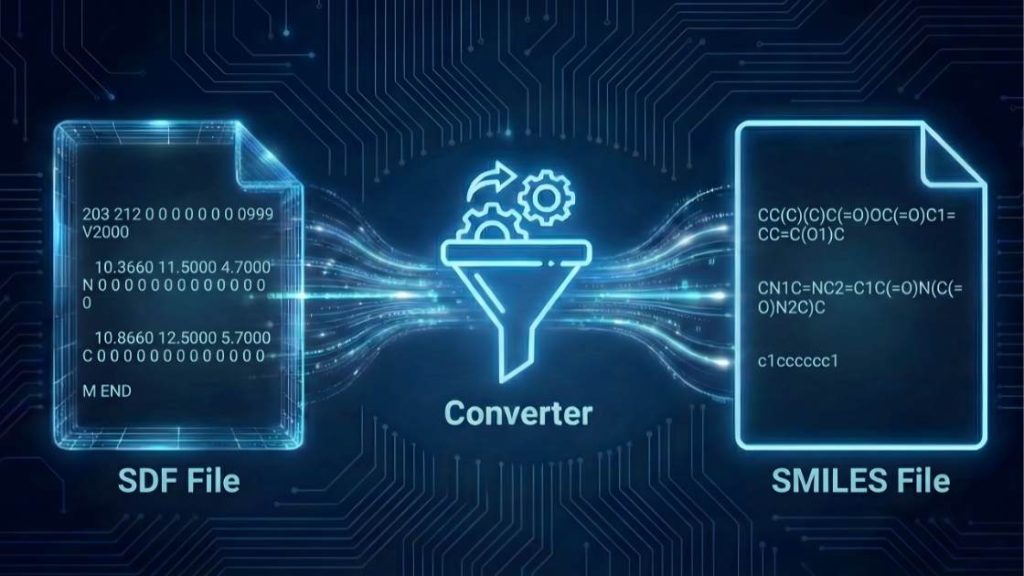
This conversion streamlines your workflow by transforming detailed 2D or 3D structural data into a compact, 1D string, which is ideal for large-scale database storage, high-throughput screening, and quantitative structure-activity relationship (QSAR) modelling.
How to use (step-by-step)
Follow these simple steps to convert your file in seconds.
- Choose Your Formats: Use the “Input Format” and “Output Format” dropdown menus to select the conversion you need. Ensure
sdf(Structure-Data File) is selected as the input andsmiles(SMILES format) as the output. - Upload Your File: Click “Upload File” or drag and drop your file directly into the designated area. You can also paste the file’s content using the “Paste Content” option.
- Start the Conversion: Press the “Convert File” button to begin the process. The tool will process your file instantly.
- Download Your File: Once the conversion is complete, a download link for your new
.smifile will appear. Click it to save the file to your device.
Tip: If you encounter an error during conversion, check the Troubleshooting Guide section below—common causes and fixes are listed.
Input, Output, and Key Changes
Understanding the transformation from a multi-line structural file to a compact line notation is key to leveraging cheminformatics. Here’s a breakdown of the formats and the changes that occur.
Sample Input (sdf Format)
The sdf format is a standard for storing one or more chemical structures. Each entry contains an atom connection table (molblock) that defines the 2D or 3D coordinates of each atom, the bonds between them, and may include associated data fields. It is a cornerstone format for compound libraries and computational chemistry.
Example of a Benzene molecule in an sdf file:
Benzene
  CHEM-COMP 1234
          6  6  0  0  0  0  0  0  0  0999 V2000
    1.5000   -0.8660    0.0000 C   0  0  0  0  0  0  0  0  0  0  0  0
    1.5000    0.8660    0.0000 C   0  0  0  0  0  0  0  0  0  0  0  0
    0.0000    1.7321    0.0000 C   0  0  0  0  0  0  0  0  0  0  0  0
   -1.5000    0.8660    0.0000 C   0  0  0  0  0  0  0  0  0  0  0  0
   -1.5000   -0.8660    0.0000 C   0  0  0  0  0  0  0  0  0  0  0  0
    0.0000   -1.7321    0.0000 C   0  0  0  0  0  0  0  0  0  0  0  0
  1  2  2  0  0  0  0
  2  3  1  0  0  0  0
  3  4  2  0  0  0  0
  4  5  1  0  0  0  0
  5  6  2  0  0  0  0
  6  1  1  0  0  0  0
M  END
$$$$
Sample Output (smiles Format)
The smiles format is a line notation that represents a chemical structure as a single string of characters. It is extremely compact and widely used in chemical databases and machine learning applications because it allows for rapid searching and processing of millions of compounds.
Example of the same Benzene molecule after conversion:
c1ccccc1
Key Changes in the Conversion Process
The conversion from sdf to smiles involves a fundamental change in data representation:
- Dimensionality Reduction: The most significant change is the conversion from a 2D or 3D coordinate-based representation to a 1D topological graph represented as a string. The explicit X, Y, and Z coordinates are discarded. This is important for applications where only the molecular connectivity matters, saving significant storage space.
- Encoding Connectivity and Aromaticity: The
smilesstring encodes atomic connectivity, bond types (single, double, triple), and ring structures. Aromatic systems, like the one in benzene, are efficiently represented with lowercase letters (e.g.,cfor an aromatic carbon), which preserves crucial chemical information. - Preservation of Stereochemistry: If the input
sdffile contains valid stereochemical information, the converter will encode it in thesmilesstring using standard conventions (e.g.,@and@@for chiral centers), ensuring that stereoisomers are not lost in translation. - Creation of a Canonical Representation: The tool generates a “canonical”
smilesstring. This means that for any given molecule, the output string will always be the same, regardless of how the atoms were ordered in the inputsdffile. This is vital for database indexing and ensuring that duplicate structures can be easily identified.
Compatible Software
The generated smiles files are ready to be used with a vast array of leading cheminformatics and data analysis software:
- Cheminformatics Toolkits: RDKit, CDK (Chemistry Development Kit)
- Molecular Modeling Suites: Schrödinger, MOE (Molecular Operating Environment)
- Chemical Databases: PubChem, ChEMBL, ZINC
- Data Analysis Platforms: KNIME, Pipeline Pilot
Troubleshooting Guide
Encountering an error can be frustrating, but most issues are easy to fix. Here are the most common problems you might face and how to resolve them.
General Tool Errors
Error: “File size exceeds the limit”
- Why it happens: Your uploaded file is larger than the maximum allowed size of 25 MB. Our server has this limit to ensure quick processing for all users.
- How to fix: If your
sdffile contains many molecules, split it into smaller files. For processing larger files or to inquire about unlimited usage, please contact us for custom solutions.
Error: “Processing timed out”
- Why it happens: The conversion for your file is taking too long. This can happen with
sdffiles containing tens of thousands of complex molecules. - How to fix: Try splitting your input file into smaller chunks. If the issue persists, please contact us to discuss options for handling larger computations.
Error: “CAPTCHA validation failed”
- Why it happens: Our system uses a CAPTCHA to prevent automated bots. This error occurs if the CAPTCHA was not solved correctly or timed out.
- How to fix: Simply reload the page and solve the new CAPTCHA. If you continue to have trouble, please get in touch with our support team.
Conversion-Specific Errors
These errors typically relate to the chemical data within your sdf file.
Error: “Invalid or corrupt SDF file structure”
- Why it happens: The input file does not follow the standard
sdfformat. Common issues include missing$$$$delimiters between molecule records, incorrect atom/bond counts in the header, or a malformed connection table. - How to fix: Open your file in a text editor or a chemical structure viewer to validate its structure. Ensure each molecule entry is separated by
$$$$on a new line and that the header information is correct.
Error: “Failed to perceive stereochemistry” or “Ambiguous stereocenter”
- Why it happens: The 3D coordinates in the
sdfdefine a stereocenter with an ambiguous or chemically impossible geometry (e.g., a flat tetrahedral carbon). The conversion engine cannot confidently assign the correct stereochemical label. - How to fix: Examine the 3D structure in a molecular visualization tool (e.g., UCSF Chimera, PyMOL). Correct any distorted geometries and re-save the
sdffile, ensuring the structure is chemically valid.
Error: “Unrecognized atom type” or “Valence error”
- Why it happens: The
sdfcontains an atom with an impossible number of bonds (e.g., a carbon with five bonds) or uses a non-standard element symbol. The conversion engine cannot process chemically invalid structures. - How to fix: Review the input structure for atoms with incorrect bond counts using a chemical editor. Correct the molecular structure and ensure all atom symbols conform to the periodic table.
If your problem isn’t listed here, we want to know about it! Please help us improve the tool by reporting the issue.
Support Our Work
We are committed to keeping our scientific tools free and accessible for everyone. If this tool has been helpful in your work, please consider supporting our mission with a donation. Your support directly helps us cover server costs and fund the development of new, powerful tools for the scientific community.
FAQ
References & Suggested Reading
This tool is built on established principles in cheminformatics to ensure accurate and reliable results. The resources listed below include foundational research and key papers that define these standards, and we highly recommend them for a deeper understanding of the scientific principles involved.
- Weininger, D. (1988). SMILES, a chemical language and information system. 1. Introduction to methodology and encoding rules. Journal of Chemical Information and Computer Sciences, 28(1), 31–36. https://doi.org/10.1021/ci00057a005
- O’Boyle, N. M., Banck, M., James, C. A., Morley, C., Vandermeersch, T., & Hutchison, G. R. (2011). Open Babel: An open chemical toolbox. Journal of Cheminformatics, 3(1), 33. https://doi.org/10.1186/1758-2946-3-33
- Kim, S., Chen, J., Cheng, T., Gindulyte, A., He, J., He, S., Li, Q., Shoemaker, B. A., Thiessen, P. A., Yu, B., Zaslavsky, L., Zhang, J., & Bolton, E. E. (2023). PubChem 2023 update. Nucleic Acids Research, 51(D1), D1373–D1380. https://doi.org/10.1093/nar/gkac956
Meet the Authors

Mahdi Morshedi Yekta
Founder & Bioinformatics Developer
Mahdi is the founder of ScienceCodons and a Medical Biotechnologist with a deep passion for computational biology. Holding an M.Sc. in Medical Biotechnology, he specializes in transforming complex biological algorithms into accessible, high-performance web tools, bridging the gap between laboratory sciences and software engineering.

Fatemeh Faryadras
Medical Biotechnologist & Researcher
Fatemeh is a Medical Biotechnologist and researcher. With extensive expertise in genetic engineering, molecular cloning, and cancer biology, she combines her rigorous laboratory background with intuitive design principles to create reliable, user-centered scientific calculators and tools.

Dr. Mosayeb Rostamian
Assistant Professor, Infectious Diseases Research Center
Certified Scientific Reviewer
Google ScholarExpert Review Process
To ensure the highest quality and scientific accuracy, this tool's underlying algorithms, formulas, and edge-case handling have been thoroughly reviewed and validated by Dr. Mosayeb Rostamian.
The "Reviewed By" badge signifies that an independent expert has evaluated the tool's logic to guarantee accuracy and alignment with the current consensus in the scientific community.