CIF to XYZ Converter
Molecular Structure Converter
High-throughput transformation across 100+ chemical formats, coordinate generation, force field minimization, and 2D depiction.

Was this tool helpful?
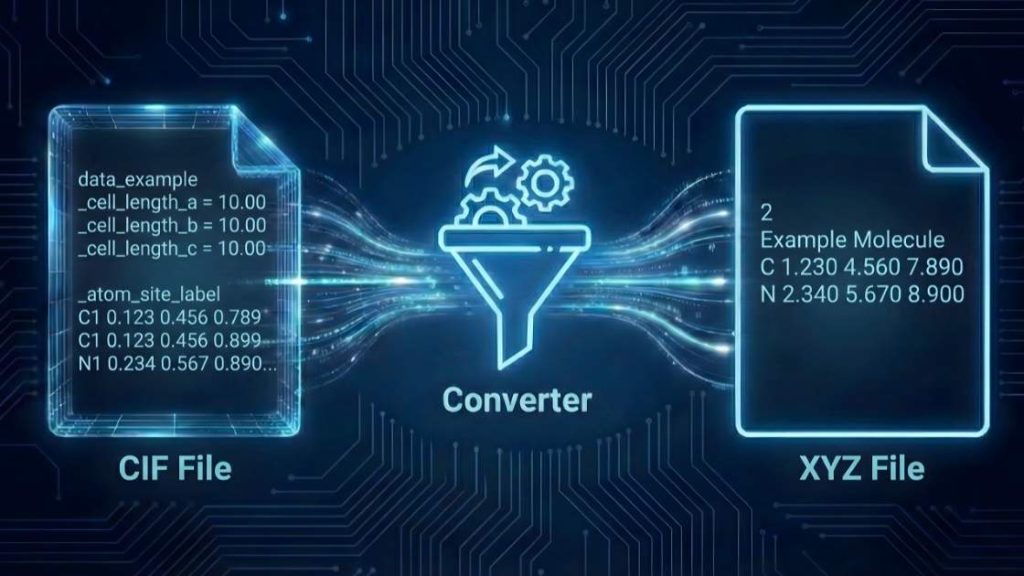
Our CIF to XYZ Converter is a streamlined web tool designed to simplify your crystal structures for further analysis. It efficiently converts complex Crystallographic Information Files (cif) into the simple xyz coordinate format. This process extracts the atomic coordinates from the cif file, applies the necessary symmetry operations to generate the full unit cell content, and removes all crystallographic metadata (like space group and unit cell parameters). This transformation provides a clean, easy-to-use Cartesian coordinate file, perfect for input into molecular visualization software or computational chemistry packages that do not require crystal lattice information.
How to Use (Step-by-Step)
Follow these simple steps to convert your file in seconds.
- Choose Your Formats: Use the “Input Format” and “Output Format” dropdown menus. Ensure
cif(Crystallographic Information File) is selected as the input andxyzas the output. - Upload Your File: Click “Upload File” or drag and drop your
ciffile directly into the designated area. You can also paste the file’s content using the “Paste Content” option. - Start the Conversion: Press the “Convert File” button to begin processing.
- Download Your File: Once the conversion is complete, a download link for your new
xyzfile will appear. Click it to save the file to your device.
Tip: If you see an error during conversion, check the Troubleshooting Guide section below—common causes and fixes are listed.
Input, Output, and Key Changes
Understanding the transformation from cif to xyz is essential for using the data correctly. Here’s a breakdown of the formats and the changes that occur during conversion.
Sample Input (cif Format)
The Crystallographic Information File (cif) is the standard format defined by the International Union of Crystallography (IUCr) for storing crystal structure data. It contains detailed information, including unit cell dimensions, space group symmetry, and fractional atomic coordinates.
Example of a cif file (showing an atom loop):
loop_
  _atom_site_label
  _atom_site_type_symbol
  _atom_site_fract_x
  _atom_site_fract_y
  _atom_site_fract_z
  C1 C 0.1234 0.5678 0.9012
  O1 O 0.2345 0.6789 0.0123
Sample Output (xyz Format)
The xyz format is a simple, plain-text format that lists only the element type and the Cartesian (X, Y, Z) coordinates for each atom. It does not contain any symmetry or unit cell information. The following example shows one of the atoms from the input after conversion and symmetry application.
Example of an xyz file line (corresponding atom):
C 1.5432 10.3456 12.7890
Key Changes in the Conversion Process
The conversion from cif to xyz involves several critical data transformations:
- Symmetry Expansion: The tool reads the fractional coordinates from the asymmetric unit and applies the space group symmetry operations to generate the coordinates for all atoms within one full unit cell.
- Conversion to Cartesian Coordinates: The fractional (
fract_x,fract_y,fract_z) coordinates from theciffile are converted into Cartesian (X, Y, Z) coordinates in Ångströms, using the unit cell parameters (a, b, c, α, β, γ) also provided in theciffile. - Removal of Crystallographic Data: All metadata related to the crystal lattice is discarded. This includes the space group, unit cell dimensions, and symmetry operations. The output
xyzfile is simply a list of atoms in 3D space.
Compatible Software
The generated xyz files are widely compatible and can be directly used with most molecular visualization and computational chemistry software, including:
- VMD (Visual Molecular Dynamics)
- Ovito
- PyMOL
- UCSF Chimera/ChimeraX
- Avogadro
- Gaussian
- ORCA
- LAMMPS
Troubleshooting Guide
Encountering an error can be frustrating, but most issues are easy to fix. Here are the most common problems you might face and how to resolve them.
General Tool Errors
Error: “File size exceeds the limit”
- Why it happens: Your uploaded file is larger than the maximum allowed size (25 MB). Our server has this limit to ensure quick processing for all users.
- How to fix:
cifFiles for complex structures can be large. If possible, remove non-essential data blocks. For processing larger files, please contact us for custom solutions.
Error: “Processing timed out”
- Why it happens: The conversion for your crystal structure is taking too long. This can happen with extremely large unit cells or very complex symmetry.
- How to fix: Verify that your structure is correct. If the issue persists because your structure is inherently complex, please contact us to discuss options for handling larger computations.
Error: “CAPTCHA validation failed”
- Why it happens: Our system uses a CAPTCHA to prevent automated bots. This error occurs if the CAPTCHA was not solved correctly or timed out.
- How to fix: Simply reload the page and solve the new CAPTCHA. If you continue to have trouble, please get in touch with our support team.
Conversion-Specific Errors
These errors typically relate to the scientific data within your cif file.
Error: “Unable to parse file” or “Invalid CIF syntax”
- Why it happens: The input
ciffile has a formatting error. This could be a missing quote, an improperly formattedloop_directive, or corrupted data. - How to fix: Carefully check the syntax of your
ciffile. You can use a validation tool (like the IUCr’scheckCIF) to identify the specific syntax error before uploading.
Error: “Missing unit cell parameters”
- Why it happens: The tool requires the unit cell dimensions (a, b, c, alpha, beta, gamma) to convert the fractional coordinates in the
ciffile into the Cartesian coordinates required for thexyzformat. - How to fix: Ensure your
ciffile contains the complete set of cell parameters (e.g.,_cell_length_a,_cell_length_b,_cell_length_c,_cell_angle_alpha,_cell_angle_beta,_cell_angle_gamma).
Error: “Missing symmetry information”
- Why it happens: To generate the full unit cell, the converter needs either the space group name (e.g.,
_symmetry_space_group_name_H-M) or an explicit list of symmetry operations (e.g.,_symmetry_equiv_pos_as_xyz). - How to fix: Add the correct space group symbol or the list of symmetry operations to your
ciffile.
If your problem isn’t listed here, we want to know about it! Please help us improve the tool by reporting the issue.
Support Our Work
We are committed to keeping our scientific tools free and accessible for everyone. If this tool has been helpful in your work, please consider supporting our mission with a donation. Your support directly helps us cover server costs and fund the development of new, powerful tools for the scientific community.
FAQ
References & Suggested Reading
This tool is built on established scientific principles and robust software to ensure accurate structural conversion. For a deeper understanding of the underlying data standards and computational methods, we recommend the following publications.
- Hall, S. R. (2016). The CIF standard: from paper specification to syntax-checking parser. Acta Crystallographica Section A, 72(6), 558–563. https://doi.org/10.1107/S205327331601287X
- Humphrey, W., Dalke, A., & Schulten, K. (1996). VMD: Visual molecular dynamics. Journal of Molecular Graphics, 14(1), 33–38. https://doi.org/10.1016/0263-7855(96)00018-5
- O’Boyle, N. M., Banck, M., James, C. A., Morley, C., Vandermeersch, T., & Hutchison, G. R. (2011). Open Babel: An open chemical toolbox. Journal of Cheminformatics, 3(1), 33. https://doi.org/10.1186/1758-2946-3-33
- Giacovazzo, C. (2005). Inorganic and organic crystal structures. Zeitschrift für Kristallographie-Crystalline Materials, 220(5-6), 397–410. https://doi.org/10.1524/zkri.220.5.397.65063
- Pettersen, E. F., Goddard, T. D., Huang, C. C., Couch, G. S., Greenblatt, D. M., Meng, E. C., & Ferrin, T. E. (2021). UCSF ChimeraX: Structure visualization for researchers, educators, and developers. Protein Science, 30(1), 70–82. https://doi.org/10.1002/pro.3943
Meet the Authors

Mahdi Morshedi Yekta
Founder & Bioinformatics Developer
Mahdi is the founder of ScienceCodons and a Medical Biotechnologist with a deep passion for computational biology. Holding an M.Sc. in Medical Biotechnology, he specializes in transforming complex biological algorithms into accessible, high-performance web tools, bridging the gap between laboratory sciences and software engineering.

Fatemeh Faryadras
Medical Biotechnologist & Researcher
Fatemeh is a Medical Biotechnologist and researcher. With extensive expertise in genetic engineering, molecular cloning, and cancer biology, she combines her rigorous laboratory background with intuitive design principles to create reliable, user-centered scientific calculators and tools.

Dr. Mosayeb Rostamian
Assistant Professor, Infectious Diseases Research Center
Certified Scientific Reviewer
Google ScholarExpert Review Process
To ensure the highest quality and scientific accuracy, this tool's underlying algorithms, formulas, and edge-case handling have been thoroughly reviewed and validated by Dr. Mosayeb Rostamian.
The "Reviewed By" badge signifies that an independent expert has evaluated the tool's logic to guarantee accuracy and alignment with the current consensus in the scientific community.