
XYZ File Viewer
XYZ Structure Viewer
To get started, load your data using the Import Data button below. Once your structure is loaded, you can control the visualization using the “Tools Panel”.
Was this tool helpful?
The XYZ Viewer is a high-performance tool designed for chemists, material scientists, and students. It provides a seamless way to view Cartesian coordinate (.xyz) files and other molecular formats, offering detailed atomic inspection without specialized desktop software.

XYZ files are commonly used to store atomic coordinates in computational chemistry and physics. But reading a list of numbers does not show how atoms are really arranged in space. This viewer solves that problem by turning coordinate data into clear 3D models. You can quickly check simulation results, see how atoms fit together, and spot bonding patterns that are hard to find in plain text files.
XYZ File Format
The XYZ file format is a simple, open standard used to specify molecular geometry. A valid .xyz file typically follows this structure:

- Line 1: The number of atoms in the molecule (an integer).
- Line 2: A comment line (can be the molecule name, energy, or left blank).
- Line 3+: One line per atom, containing the element symbol followed by the X, Y, and Z coordinates (usually in Ångströms).
Example File Content:
3
Water Molecule Structure
O   0.0000   0.0000   0.1173
H   0.0000   0.7575  -0.4692
H   0.0000  -0.7575  -0.4692
How to Use
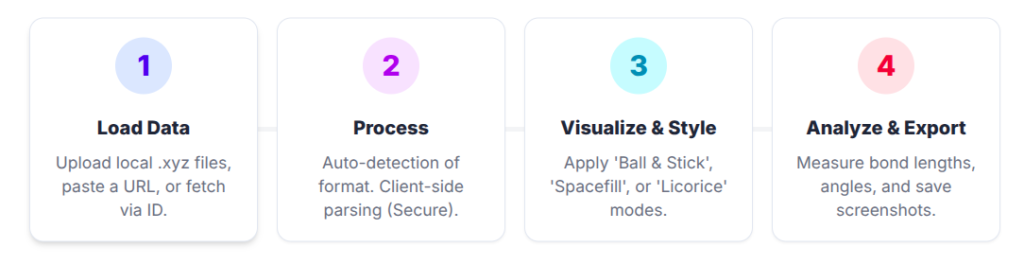
A) Loading a Structure
You have several ways to load your chemical data:
- Upload Your Files:
- Click the Select files… button and choose the
.xyzor other structure file(s) from your computer. - You can manually select the file format (Format) or leave it on Auto for automatic detection.
- After selecting, click the Apply button.
- Click the Select files… button and choose the
- Import from Databases:
- Expand this section if you wish to fetch structures from supported public repositories.
- Enter the identifier and press Apply.
- Load from URL:
- Enter the direct URL of a remote XYZ file in this section and press Apply.
B) Interacting with the Viewport
- Rotate: Click and drag the left mouse button (or one finger on mobile) to view the molecule from all angles.
- Zoom: Use the mouse scroll wheel (or pinch with two fingers on mobile) to inspect bond details or zoom out to see the whole lattice.
- Pan: Click and drag the right mouse button (or drag with two fingers on mobile).
- Select: Click on an atom to highlight it. You can select multiple atoms by holding the Shift key.
- Focus: After selecting an atom or group, use the magnifying glass icon in the Tools Panel to center the view on it.
C) Using the Tools Panel
In the right panel (Tools Panel), you can customize the visualization:
- Structure: Manage loaded models. Toggle visibility for different parts of a complex system.
- Measurements:
- To measure bond lengths or angles, click + Add.
- Select the type (e.g., Distance for bonds, Angle for geometry).
- Click on the specific atoms in the 3D viewport to display the value.
- Quick Styles:
- Instantly change how the molecule is rendered.
- Common styles include Ball & Stick (ideal for seeing bonds), Spacefill (for volume), or Surface (for shape).
- Components:
- For advanced control. Define specific representations for different parts of the molecule (e.g., show the solvent as ‘Spacefill’ and the solute as ‘Ball & Stick’).
D) Saving & Exporting
- Save Screenshot: Capture high-resolution images of your molecules for reports or presentations using the camera icon (📸).
- Save Session: Use the save disk icon (💾) to export a session file. This allows you to reopen the viewer later with the exact same orientation, measurements, and visual settings.
Key Features
1 Crystal Clear Atomic Visualization
Visualize atomic coordinates with exceptional clarity. Whether you are analyzing a single small molecule or a dense crystalline lattice, our engine renders every atom and bond with precision, maintaining high performance even for complex point clouds.
2 Essential Geometric Analysis
Verify your simulation results instantly. The tool provides dedicated features for measuring bond lengths and angles, helping you confirm molecular geometries and steric arrangements without leaving your browser.
3 Dynamic Representation Modes
Switch effortlessly between visualization styles suited for chemistry. Use Ball & Stick to emphasize connectivity, Spacefill (CPK) to assess volume, or Licorice for a cleaner, stick-based view of complex structures.
4 Universal Chemical File Support
Beyond the standard XYZ Cartesian format, our viewer natively handles a wide range of chemical data types, including .mol, .sdf, and .cif. This makes it the perfect companion for computational chemistry workflows and material science research.
FAQ
Reference
Sehnal, D., Bittrich, S., Deshpande, M., Svobodová, R., Berka, K., Bazgier, V., Velankar, S., Burley, S. K., Koča, J., & Rose, A. S. (2021). Mol* Viewer: modern web app for 3D visualization and analysis of large biomolecular structures. Nucleic Acids Research, 49(W1), W431–W437. https://doi.org/10.1093/nar/gkab314
Meet the Authors

Mahdi Morshedi Yekta
Founder & Bioinformatics Developer
Mahdi is the founder of ScienceCodons and a Medical Biotechnologist with a deep passion for computational biology. Holding an M.Sc. in Medical Biotechnology, he specializes in transforming complex biological algorithms into accessible, high-performance web tools, bridging the gap between laboratory sciences and software engineering.

Fatemeh Faryadras
Medical Biotechnologist & Researcher
Fatemeh is a Medical Biotechnologist and researcher. With extensive expertise in genetic engineering, molecular cloning, and cancer biology, she combines her rigorous laboratory background with intuitive design principles to create reliable, user-centered scientific calculators and tools.

Dr. Mosayeb Rostamian
Assistant Professor, Infectious Diseases Research Center
Certified Scientific Reviewer
Google ScholarExpert Review Process
To ensure the highest quality and scientific accuracy, this tool's underlying algorithms, formulas, and edge-case handling have been thoroughly reviewed and validated by Dr. Mosayeb Rostamian.
The "Reviewed By" badge signifies that an independent expert has evaluated the tool's logic to guarantee accuracy and alignment with the current consensus in the scientific community.