
STOCKHOLM File Format Converter
Bioinformatics Converter
Convert between various bioinformatics formats instantly
Paste Data
Upload File
Conversion output will appear here...
Was this tool helpful?
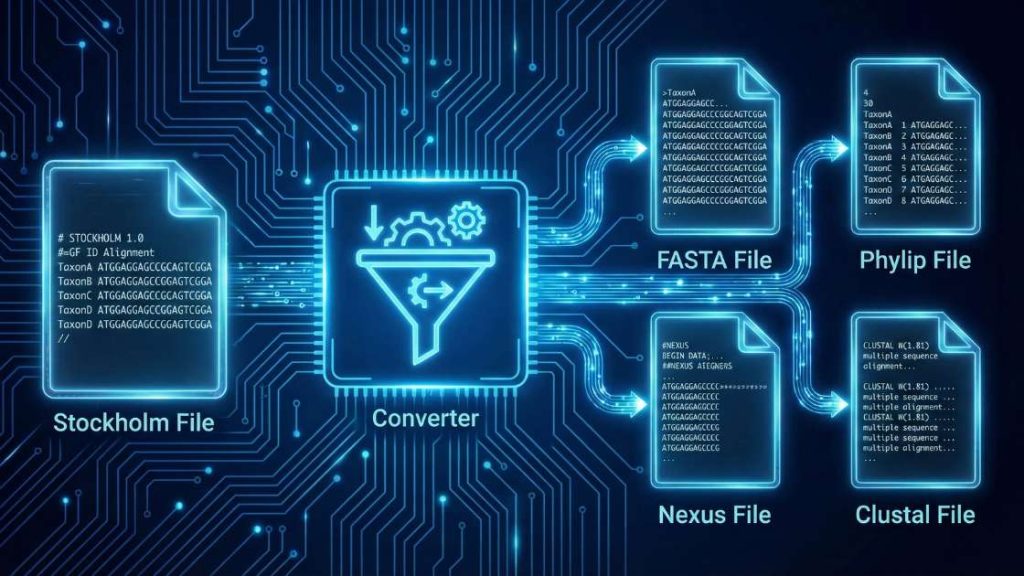
Our STOCKHOLM File Format Converter is a specialized bioinformatics utility designed to improve interoperability among multiple sequence alignments (MSAs). This tool expertly converts alignments from the annotation-rich Stockholm format, commonly used by databases such as Pfam, into more widely supported formats, including FASTA, PHYLIP, and Nexus. During conversion, the tool extracts the core alignment, allowing you to discard or retain metadata, depending on the chosen output format. This process streamlines your workflow by preparing your MSA data for a wide range of downstream applications, such as phylogenetic analysis, homology modeling, and conservation analysis.
| Input Format | Data Type | Possible Output Formats |
|---|---|---|
stockholm | Multiple Sequence Alignment (MSA) | fasta, phylip, nexus, clustal |
How to use (step-by-step)
Follow these simple steps to convert your alignment file in seconds.
- Upload Your File: Click “Upload File” or drag and drop your
.stoor.stkfile directly into the designated area. You can also paste the file’s content using the “Paste Data” option. - Select Your Output Format: Use the “Output Format” dropdown menu to select your desired format, such as
fasta(for broad compatibility),phylip(for phylogenetic software), ornexus(to preserve metadata). - Start the Conversion: Press the “Convert File” button to begin the process.
- Download Your File: Once the conversion is complete, a download link for your new file will appear. Click it to save the file to your device.
Tip: If you see an error during conversion, check the Troubleshooting Guide below—common causes and fixes are listed.
Understanding the Conversion Process
Converting a stockholm file involves parsing its unique block structure and reformatting the alignment and its associated metadata.
The Input: stockholm Format
The stockholm format is a text-based format for storing multiple sequence alignments. Its key feature is the ability to include extensive, line-by-line metadata for sequences (#=GS), columns (#=GC), and the overall alignment (#=GF). Alignments are presented in an interleaved block, and each record is terminated by a // line.
Example stockholm file:
# STOCKHOLM 1.0
#=GF ID PF00001
#=GF AC PF00001.1

Seq1   KALKA...-GP...-A--
Seq2   V-LSP...-AD...-KTN
#=GS Seq2 DE Cytochrome c

Seq1   APG--SYT--AANKNKGIIW
Seq2   V-LSPADKTNVKAAWGKVGA
#=GC SS_cons ....<....>........

//
Common Output Formats & Their Uses
Your choice of output format depends on your downstream analysis goals.
fastaFormat: The most universal format for sequence data. It represents the alignment simply, with each sequence having a header line (>) followed by the sequence data. Allstockholmannotations are discarded.phylipFormat: A compact format required by many phylogenetic analysis programs (e.g., PHYLIP, RAxML). It has a strict header defining the number and length of sequences, followed by the alignment block. Sequence names are often truncated. Annotations are discarded.nexusFormat: A highly structured, block-based format that can store the alignment, phylogenetic trees, and metadata in a single file. It is capable of preserving some of thestockholmannotations.clustalFormat: The default output for the Clustal family of alignment programs. It displays the alignment in blocks and may include a consensus line. It’s human-readable and supported by many alignment viewers.
The Core Transformation Process
- Parses the
stockholmStructure: The tool reads the header, interleaved alignment blocks, and metadata lines (#=GF,#=GS,#=GC). - Extracts Alignment & Metadata: It separates each sequence name from its corresponding sequence string and reads any associated annotations.
- Applies New Formatting Rules: It reconstructs the alignment according to the syntax of your chosen output format—whether that’s adding
>headers forfasta, creating the strict header forphylip, or organizing data intoNEXUSblocks. Annotations are either integrated (for formats likenexus) or discarded.
Troubleshooting Guide
Encountering an error can be frustrating, but most issues are easy to fix.
General Tool Errors
- Error: “File size exceeds the limit”
- Why it happens: Your uploaded file is larger than our server’s maximum allowed size. This limit ensures fast processing for all users.
- How to fix: If your alignment file is exceptionally large, consider splitting it into smaller files. For batch processing needs, please contact us for custom solutions.
- Error: “Processing timed out”
- Why it happens: The conversion is taking too long to complete, which can occur with files containing a very large number of sequences or extremely long alignments.
- How to fix: Try simplifying your input file. If the issue persists due to the dataset’s complexity, please contact us to discuss options for handling larger computations.
- Error: “CAPTCHA validation failed”
- Why it happens: Our system uses a CAPTCHA to prevent automated bots. This error occurs if the CAPTCHA was not solved correctly or timed out.
- How to fix: Simply reload the page and solve the new CAPTCHA. If you continue to have trouble, please get in touch with our support team.
Conversion-Specific Errors
- Error: “Mismatched sequence lengths in alignment”
- Why it happens: The input
stockholmfile contains sequences of different lengths, meaning it is not a valid, flush alignment. This can be caused by manual editing errors. - How to fix: Before converting, you must repair the alignment. Open the file in an alignment editor like Jalview or UGENE and either manually add gaps (
-) to the shorter sequences or remove the extra columns from the longer ones until all sequences are of equal length.
- Why it happens: The input
- Error: “Invalid STOCKHOLM format: Missing header or terminator”
- Why it happens: The file is missing the mandatory
# STOCKHOLM 1.0header on the first line or the//terminator on the last line. Without these markers, the parser cannot identify the file type or determine where the alignment record ends. - How to fix: Open the file in a plain text editor. Add
# STOCKHOLM 1.0to the very beginning of the file and/or//on a new line at the very end.
- Why it happens: The file is missing the mandatory
- Error: “Duplicate sequence name found”
- Why it happens: Two or more sequences in the alignment share the exact same name/identifier. Many downstream formats and analysis tools require unique names for each sequence.
- How to fix: Manually edit your input file in a text editor to ensure every sequence name is unique. For example, you can change
Seq1andSeq1toSeq1_aandSeq1_b.
Support Our Work
Your research matters, and we believe powerful scientific tools should be available to everyone, everywhere, without cost. This converter is built and maintained by a small team dedicated to open science.
If this tool has helped you advance your project, please consider supporting our mission. Your contribution directly funds server maintenance, ongoing updates, and the development of new free utilities for the global scientific community.
Can’t donate? You can still help! Sharing this tool with your colleagues and on social media is another powerful way to support our work. Thank you for being part of our community!
FAQ
References & Suggested Reading
This tool is built upon foundational work in bioinformatics. For those interested in the underlying principles, we recommend the following resources.
- Sonnhammer, E. L., Eddy, S. R., & Durbin, R. (1997). Pfam: a comprehensive database of protein domain families based on seed alignments. Proteins: Structure, Function, and Bioinformatics, 28(3), 405-420. This paper introduces the Pfam database, for which the Stockholm format was developed, providing context for its annotation-rich design.
- Maddison, D. R., Swofford, D. L., & Maddison, W. P. (1997). NEXUS: an extensible file format for systematic information. Systematic Biology, 46(4), 590-621. https://doi.org/10.1093/sysbio/46.4.590 The original paper defining the NEXUS format, explaining its block structure and extensibility, which makes it ideal for storing complex datasets.
- Felsenstein, J. (1989). PHYLIP—Phylogeny Inference Package (Version 3.2). Cladistics, 5, 164-166. A key paper describing the PHYLIP package, whose simple and strict input format became a standard for many phylogenetic tools.
- Waterhouse, A. M., Procter, J. B., Martin, D. M. A., Clamp, M., & Barton, G. J. (2009). Jalview Version 2—a multiple sequence alignment editor and analysis workbench. Bioinformatics, 25(9), 1189-1191. https://doi.org/10.1093/bioinformatics/btp033 Introduces Jalview, a powerful and popular tool for visualizing and editing multiple sequence alignments in various formats, including Stockholm.
- Cock, P. J. A., Antao, T., Chang, J. T., et al. (2009). Biopython: freely available Python tools for computational molecular biology and bioinformatics. Bioinformatics, 25(11), 1422–1423. https://doi.org/10.1093/bioinformatics/btp163 This paper introduces the Biopython project, the vital open-source library that provides the computational engine for this converter.
Meet the Authors

Mahdi Morshedi Yekta
Founder & Bioinformatics Developer
Mahdi is the founder of ScienceCodons and a Medical Biotechnologist with a deep passion for computational biology. Holding an M.Sc. in Medical Biotechnology, he specializes in transforming complex biological algorithms into accessible, high-performance web tools, bridging the gap between laboratory sciences and software engineering.

Fatemeh Faryadras
Medical Biotechnologist & Researcher
Fatemeh is a Medical Biotechnologist and researcher. With extensive expertise in genetic engineering, molecular cloning, and cancer biology, she combines her rigorous laboratory background with intuitive design principles to create reliable, user-centered scientific calculators and tools.

Dr. Mosayeb Rostamian
Assistant Professor, Infectious Diseases Research Center
Certified Scientific Reviewer
Google ScholarExpert Review Process
To ensure the highest quality and scientific accuracy, this tool's underlying algorithms, formulas, and edge-case handling have been thoroughly reviewed and validated by Dr. Mosayeb Rostamian.
The "Reviewed By" badge signifies that an independent expert has evaluated the tool's logic to guarantee accuracy and alignment with the current consensus in the scientific community.