
MOL2 File Converter
Molecular Structure Converter
High-throughput transformation across 100+ chemical formats, coordinate generation, force field minimization, and 2D depiction.

Was this tool helpful?
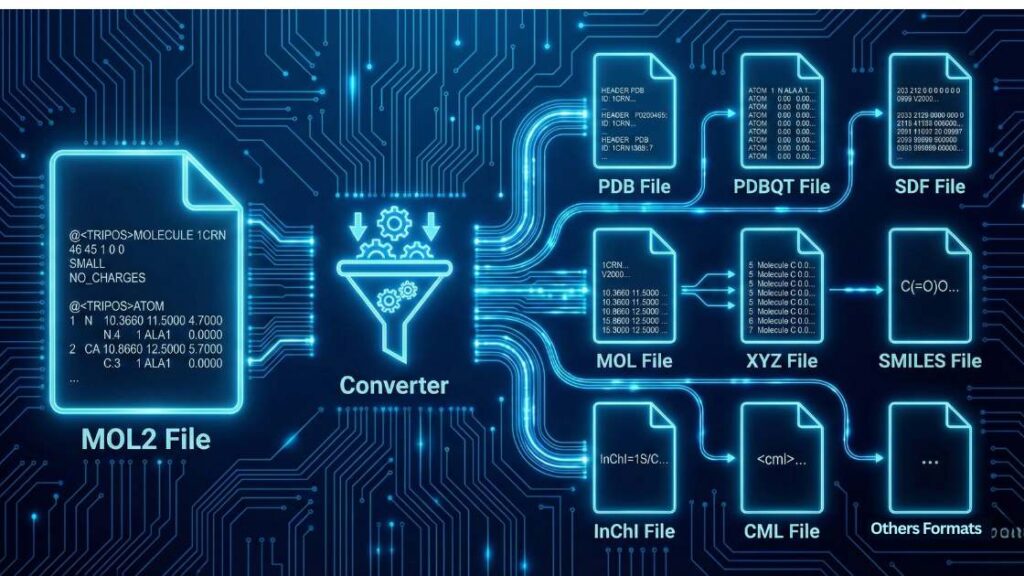
The MOL2 File Converter is an online tool that translates chemical structure data between the Tripos mol2 format and various molecular modeling standards. It enables researchers to efficiently manage structural information, such as atomic coordinates, bond connectivity, and partial charges, ensuring compatibility across simulation and docking platforms. The converter preserves essential chemical metadata and adapts file structures to meet the syntax requirements of each target format, including connectivity blocks, force field parameters, or coordinate systems.
The following table summarizes the input capabilities and the extensive range of potential outputs available through our conversion engine.
| mol2 | 3D Molecular Structure | PDB, PDBQT, SDF, MOL, XYZ, SMILES, InChI, CML, GAMESS, Gaussian Input, GRO, Canonical SMILES, PQR, VASP, POSCAR |
How to use
- Set Your Formats: Select MOL2 from the “Input Format” dropdown menu. Then select your target format (e.g., PDB, SDF, or ACESIN) from the “Output Format” dropdown.
- Upload Your Data: You have two primary methods to provide your structural data:
- File Upload: Click the Upload File button to select a file from your computer, or simply drag and drop your mol2 file into the blue-dashed “Drag & Drop Your File” zone. You can also use the Browse Files button within that zone.
- Paste Content: If you have the file content copied to your clipboard, click the Paste Content button to toggle the text input area and paste the raw mol2 data directly.
- Process the Conversion: Once your data is loaded, click the Convert File button (identified by the gear icon) to initiate the transformation.
- Manage Your Session: If you need to start over or process a different molecule, use the Clear All button to reset all input fields and uploaded data.
Features
- High-Fidelity Coordinate Mapping: Accurately translates 3D Cartesian coordinates to ensure that molecular geometry and stereochemistry remain intact during the conversion process.
- Bond Order Preservation: Expertly handles the @<TRIPOS> BOND section, ensuring that aromaticity and bond types (single, double, triple) are correctly mapped to target formats like SDF or PDB.
- Automated Charge Handling: Supports the transfer of partial charges (e.g., Gasteiger, Marsili) from the mol2 source to specialized formats like PQR or PDBQT.
- Format-Specific Optimization: Automatically reformats data to meet the rigid requirements of specific software suites, such as generating proper residue naming for PDB or lattice vectors for VASP.
- Universal Compatibility: Leveraging a powerful informatics engine, the tool supports a vast list of common conversions, including:
- mol2 to PDB: Essential for visualization and structural analysis.
- mol2 to PDBQT: Critical for molecular docking workflows in AutoDock Vina.
- mol2 to SDF/MOL: Standard for chemical database entry and 2D/3D structure storage.
- mol2 to SMILES/InChI: Useful for cheminformatics searching and chemical identity verification.
- mol2 to GRO: Optimized for molecular dynamics setup in GROMACS.
- mol2 to Gaussian/GAMESS: Seamlessly generates input files for quantum mechanical calculations.
The Core Transformation Process

Regardless of the output you select, the converter performs these fundamental steps to ensure chemical integrity:
- Parses the mol2 Header and Sections: The engine reads the @<TRIPOS> MOLECULE, @<TRIPOS> ATOM, and @<TRIPOS> BOND sections to identify the molecule’s name, atom types, and hybridization states.
- Extracts Structural Data: It maps the 3D Cartesian coordinates (x, y, z) for every atom and catalogs the specific bond orders (single, double, triple, or aromatic) defined in the source file.
- Applies New Formatting Rules: It rebuilds the file according to the precise syntax of your chosen output format.
Applications
The ability to convert mol2 files is essential in various stages of computer-aided drug discovery (CADD) and structural biology:
- Molecular Docking: Preparing ligands for tools like AutoDock Vina by converting mol2 structures into PDBQT files with added charges and rotatable bond definitions.
- Molecular Dynamics: Converting refined structures into GRO or PDB formats for use in simulation packages like GROMACS or AMBER.
- Database Management: Transforming complex 3D structures into SDF or SMILES formats for high-throughput screening and chemical database storage.
- Quantum Chemistry: Generating input files for Gaussian or GAMESS to perform geometry optimizations or electronic property calculations.
Troubleshooting Guide
If you encounter issues during the conversion process, please refer to the common errors below:
1- Error: “Missing atoms or residues.”
Your input mol2 file may be structurally incomplete or contain “dummy” atoms that do not map correctly to the standard definitions of the output format. How to fix: Verify the integrity of your mol2 file in a molecular viewer. Ensure that the molecule is fully defined and that all required atomic records are present before re-uploading.
2- Error: “Unrecognized atom type or bond type.”
The mol2 file contains non-standard Tripos atom types (e.g., custom force field labels) that the conversion engine cannot map to the target format’s library. How to fix: Ensure all atom types conform to the Tripos MOL2 standard. You may need to manually edit the @<TRIPOS> ATOM section to use standard Sybyl atom types.
3- Error: “Failed to assign partial charges.“
This occurs when the tool cannot calculate or transfer charges due to distorted geometry, such as overlapping atoms or unrealistic bond lengths. How to fix: Perform a quick energy minimization of your structure using software such as Chimera or Avogadro to correct the geometry before attempting the conversion again.
If your problem isn’t listed here, we want to know about it! Please help us improve the tool by reporting the issue.
References
- Berman, H. M. (2000). The Protein Data Bank. Nucleic Acids Research, 28(1), 235–242. https://doi.org/10.1093/nar/28.1.235
- Trott, O., & Olson, A. J. (2009). AutoDock Vina: Improving the speed and accuracy of docking with a new scoring function, efficient optimization, and multithreading. Journal of Computational Chemistry, 31(2), 455–461. https://doi.org/10.1002/jcc.21334
- O’Boyle, N. M., Banck, M., James, C. A., Morley, C., Vandermeersch, T., & Hutchison, G. R. (2011). Open Babel: An open chemical toolbox. Journal of Cheminformatics, 3(1). https://doi.org/10.1186/1758-2946-3-33
Meet the Authors

Mahdi Morshedi Yekta
Founder & Bioinformatics Developer
Mahdi is the founder of ScienceCodons and a Medical Biotechnologist with a deep passion for computational biology. Holding an M.Sc. in Medical Biotechnology, he specializes in transforming complex biological algorithms into accessible, high-performance web tools, bridging the gap between laboratory sciences and software engineering.

Fatemeh Faryadras
Medical Biotechnologist & Researcher
Fatemeh is a Medical Biotechnologist and researcher. With extensive expertise in genetic engineering, molecular cloning, and cancer biology, she combines her rigorous laboratory background with intuitive design principles to create reliable, user-centered scientific calculators and tools.

Dr. Mosayeb Rostamian
Assistant Professor, Infectious Diseases Research Center
Certified Scientific Reviewer
Google ScholarExpert Review Process
To ensure the highest quality and scientific accuracy, this tool's underlying algorithms, formulas, and edge-case handling have been thoroughly reviewed and validated by Dr. Mosayeb Rostamian.
The "Reviewed By" badge signifies that an independent expert has evaluated the tool's logic to guarantee accuracy and alignment with the current consensus in the scientific community.